
 Алгебра
 Английский
 Биология
 География
 Геометрия
 История
 Русский
 Обществознание
 Физика
 Химия
 Информатика
 Литература
 Математика
Ответ:
Solution:
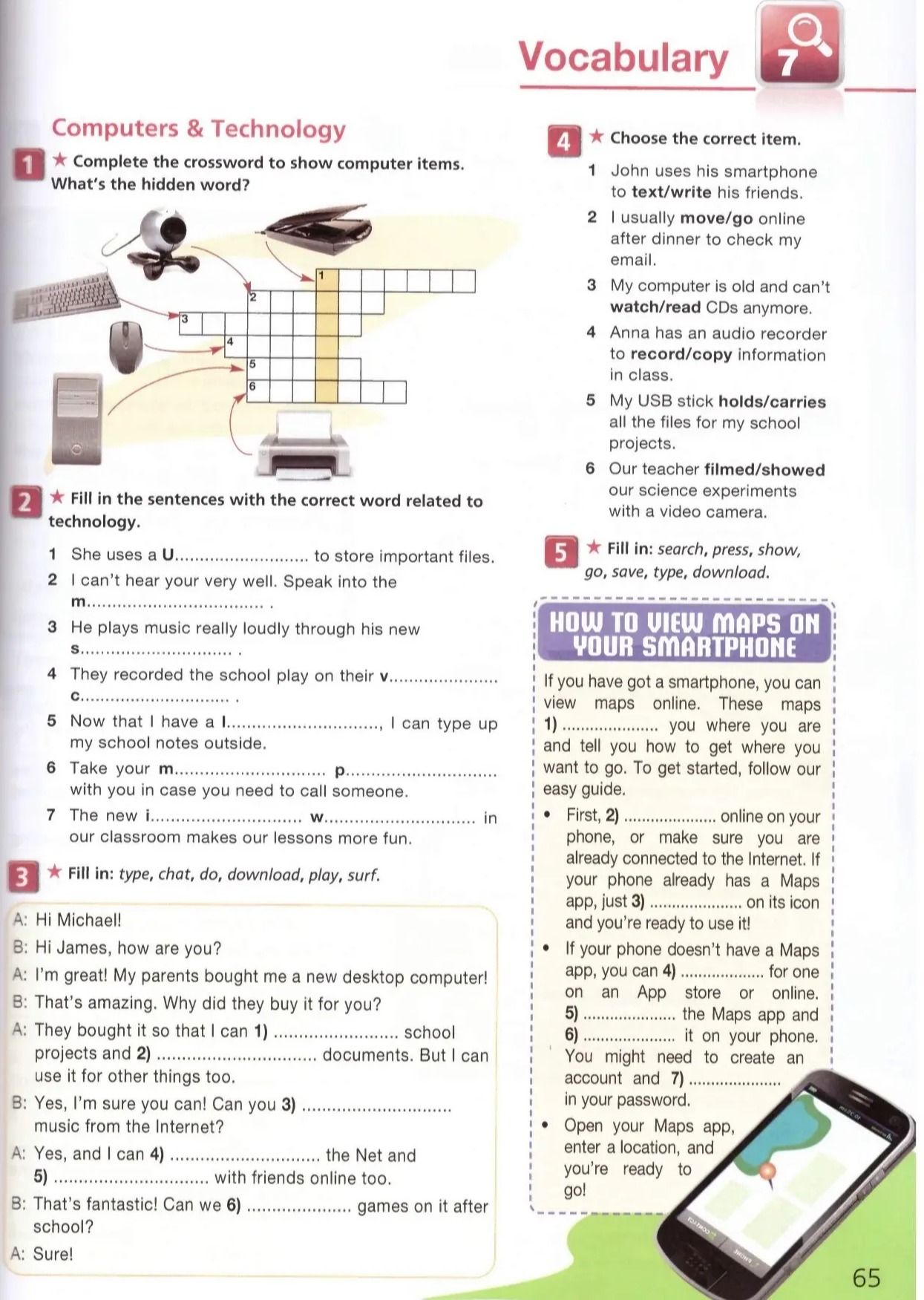
Here are the completed sentences:
HOW TO VIEW MAPS ON YOUR SMARTPHONE
If you have got a smartphone, you can view maps online. These maps 1) show you where you are and tell you how to get where you want to go. To get started, follow our easy guide.
- First, 2) go online on your phone, or make sure you are already connected to the Internet. If your phone already has a Maps app, just 3) press on its icon and you're ready to use it!
- If your phone doesn't have a Maps app, you can 4) download for one on an App store or online. 5) save the Maps app and 6) type it on your phone. You might need to create an account and 7) search in your password.
- Open your Maps app, enter a location, and you're ready to go!
Answer: 1) show, 2) go, 3) press, 4) download, 5) save, 6) type, 7) search.
