
 Алгебра
 Английский
 Биология
 География
 Геометрия
 История
 Русский
 Обществознание
 Физика
 Химия
Химия Информатика
 Литература
 Математика
Вопрос:
Please identify the elements shown in the image and describe their functions.
Ответ:
Description of Interface Elements:
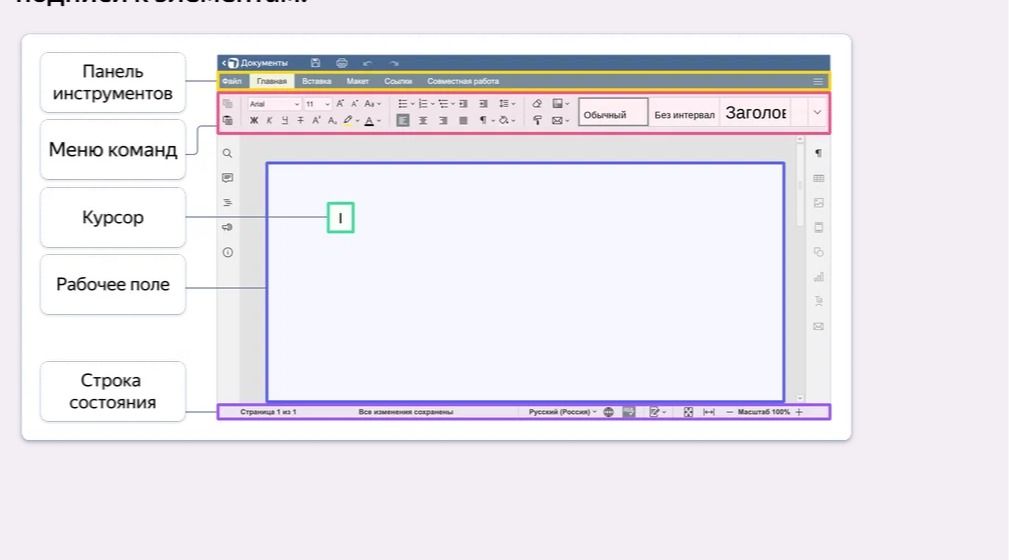
The image displays a user interface, likely a text editor or word processing program, with several key components labeled.
- Панель инструментов (Toolbar): This section contains various icons and buttons that represent quick access to common functions like formatting text (bold, italics, alignment), inserting objects, and other editing tools.
- Меню команд (Command Menu): Located below the toolbar, this area displays tabs for different command groups such as 'File', 'Home', 'Insert', 'Layout', 'References', and 'Collaboration'. Clicking on these tabs would typically reveal a more extensive set of commands and options.
- Курсор (Cursor): Represented by a blinking vertical line within the 'Рабочее поле', the cursor indicates the current position where text will be entered or edits will be made.
- Рабочее поле (Working Area/Document Canvas): This is the main central area where the document content is displayed and edited. It's the primary space for typing, formatting, and arranging text and other elements.
- Строка состояния (Status Bar): Situated at the bottom of the application window, this bar provides information about the current document, such as the page number ('Страница 1 из 1'), word count ('Все изменения сохранены'), language settings ('Русский (Россия)'), and zoom level ('Масштаб 100%').
