
 Алгебра
 Английский
 Биология
 География
 Геометрия
 История
 Русский
 Обществознание
 Физика
 Химия
 Информатика
 Литература
 Математика
Ответ:
📍Тапни предложение — включится подсветка для легкого переноса текста в тетрадь.
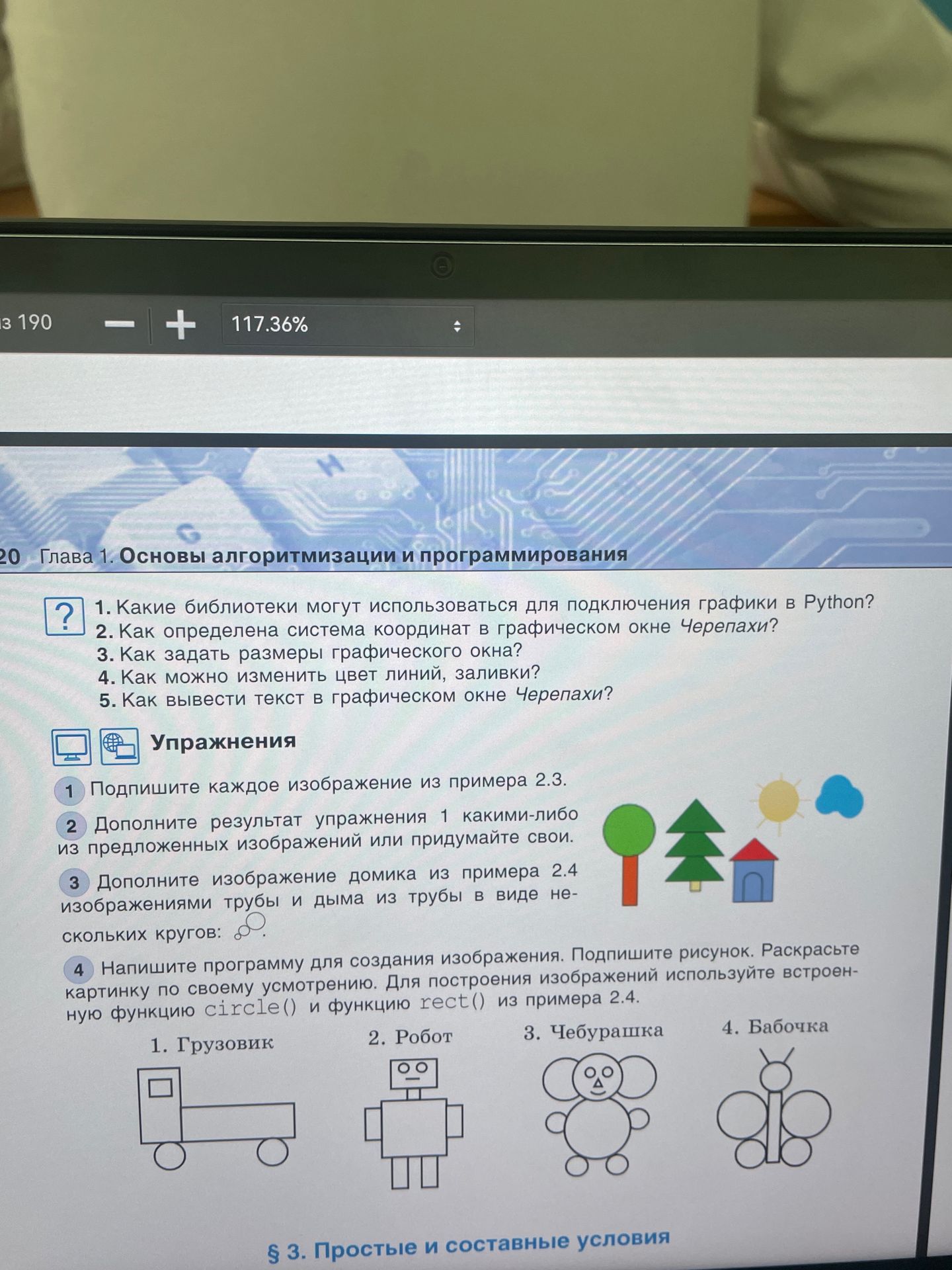
Функция rect() из примера 2.4 не видна, поэтому ниже даны три самостоятельных варианта на стандартной библиотеке Turtle. В каждом варианте есть подпись и цветная картинка; прямоугольники рисуются вспомогательной функцией, круги — методом circle().
Вариант 1. Грузовик
import turtle

screen = turtle.Screen()
screen.setup(600, 400)
t = turtle.Turtle()
t.speed(0)

def rect(x, y, w, h, color):
    t.penup(); t.goto(x, y); t.setheading(0)
    t.color('black', color); t.pendown(); t.begin_fill()
    for side in (w, h, w, h):
        t.forward(side); t.left(90)
    t.end_fill()

rect(-180, -70, 90, 100, 'royalblue')
rect(-90, -70, 210, 70, 'tomato')
rect(-160, -5, 48, 25, 'lightcyan')
for x in (-115, 90):
    t.penup(); t.goto(x, -95); t.color('black', 'gray')
    t.pendown(); t.begin_fill(); t.circle(25); t.end_fill()
t.penup(); t.goto(-65, 115); t.color('black')
t.write('Грузовик', font=('Arial', 18, 'normal'))
t.hideturtle(); turtle.done()
Вариант 2. Робот
import turtle

screen = turtle.Screen()
screen.setup(600, 400)
t = turtle.Turtle()
t.speed(0)

def rect(x, y, w, h, color):
    t.penup(); t.goto(x, y); t.setheading(0)
    t.color('black', color); t.pendown(); t.begin_fill()
    for side in (w, h, w, h):
        t.forward(side); t.left(90)
    t.end_fill()

rect(-65, -55, 130, 110, 'lightsteelblue')
rect(-45, 65, 90, 55, 'silver')
rect(-105, -35, 40, 22, 'gold')
rect(65, -35, 40, 22, 'gold')
rect(-45, -105, 30, 50, 'slategray')
rect(15, -105, 30, 50, 'slategray')
for x in (-22, 22):
    t.penup(); t.goto(x, 85); t.color('black', 'white')
    t.pendown(); t.begin_fill(); t.circle(9); t.end_fill()
rect(-20, 72, 40, 5, 'black')
t.penup(); t.goto(-45, 145); t.color('black')
t.write('Робот', font=('Arial', 18, 'normal'))
t.hideturtle(); turtle.done()
Вариант 3. Бабочка
import turtle

screen = turtle.Screen()
screen.setup(600, 400)
t = turtle.Turtle()
t.speed(0)

def circle(x, y, radius, color):
    t.penup(); t.goto(x, y - radius); t.color('black', color)
    t.pendown(); t.begin_fill(); t.circle(radius); t.end_fill()

# Крылья, туловище и голова
circle(-65, 15, 48, 'orchid')
circle(65, 15, 48, 'lightskyblue')
circle(-45, -65, 30, 'plum')
circle(45, -65, 30, 'lightblue')
circle(0, -5, 12, 'goldenrod')
circle(0, 42, 18, 'gold')
# Усики
for x in (-8, 8):
    t.penup(); t.goto(0, 57); t.pendown(); t.goto(x, 82)
t.penup(); t.goto(-55, 125); t.color('black')
t.write('Бабочка', font=('Arial', 18, 'normal'))
t.hideturtle(); turtle.done()Функция rect() из примера 2.4 не видна, поэтому ниже даны три самостоятельных варианта на стандартной библиотеке Turtle. В каждом варианте есть подпись и цветная картинка; прямоугольники рисуются вспомогательной функцией, круги — методом circle().
Вариант 1. Грузовик
import turtle

screen = turtle.Screen()
screen.setup(600, 400)
t = turtle.Turtle()
t.speed(0)

def rect(x, y, w, h, color):
    t.penup(); t.goto(x, y); t.setheading(0)
    t.color('black', color); t.pendown(); t.begin_fill()
    for side in (w, h, w, h):
        t.forward(side); t.left(90)
    t.end_fill()

rect(-180, -70, 90, 100, 'royalblue')
rect(-90, -70, 210, 70, 'tomato')
rect(-160, -5, 48, 25, 'lightcyan')
for x in (-115, 90):
    t.penup(); t.goto(x, -95); t.color('black', 'gray')
    t.pendown(); t.begin_fill(); t.circle(25); t.end_fill()
t.penup(); t.goto(-65, 115); t.color('black')
t.write('Грузовик', font=('Arial', 18, 'normal'))
t.hideturtle(); turtle.done()Вариант 2. Робот
import turtle

screen = turtle.Screen()
screen.setup(600, 400)
t = turtle.Turtle()
t.speed(0)

def rect(x, y, w, h, color):
    t.penup(); t.goto(x, y); t.setheading(0)
    t.color('black', color); t.pendown(); t.begin_fill()
    for side in (w, h, w, h):
        t.forward(side); t.left(90)
    t.end_fill()

rect(-65, -55, 130, 110, 'lightsteelblue')
rect(-45, 65, 90, 55, 'silver')
rect(-105, -35, 40, 22, 'gold')
rect(65, -35, 40, 22, 'gold')
rect(-45, -105, 30, 50, 'slategray')
rect(15, -105, 30, 50, 'slategray')
for x in (-22, 22):
    t.penup(); t.goto(x, 85); t.color('black', 'white')
    t.pendown(); t.begin_fill(); t.circle(9); t.end_fill()
rect(-20, 72, 40, 5, 'black')
t.penup(); t.goto(-45, 145); t.color('black')
t.write('Робот', font=('Arial', 18, 'normal'))
t.hideturtle(); turtle.done()Вариант 3. Бабочка
import turtle

screen = turtle.Screen()
screen.setup(600, 400)
t = turtle.Turtle()
t.speed(0)

def circle(x, y, radius, color):
    t.penup(); t.goto(x, y - radius); t.color('black', color)
    t.pendown(); t.begin_fill(); t.circle(radius); t.end_fill()

# Крылья, туловище и голова
circle(-65, 15, 48, 'orchid')
circle(65, 15, 48, 'lightskyblue')
circle(-45, -65, 30, 'plum')
circle(45, -65, 30, 'lightblue')
circle(0, -5, 12, 'goldenrod')
circle(0, 42, 18, 'gold')
# Усики
for x in (-8, 8):
    t.penup(); t.goto(0, 57); t.pendown(); t.goto(x, 82)
t.penup(); t.goto(-55, 125); t.color('black')
t.write('Бабочка', font=('Arial', 18, 'normal'))
t.hideturtle(); turtle.done()